Custom Cyclone Dust Separator

– or –

Falling down a rabbit hole over 9sqft of floorspace
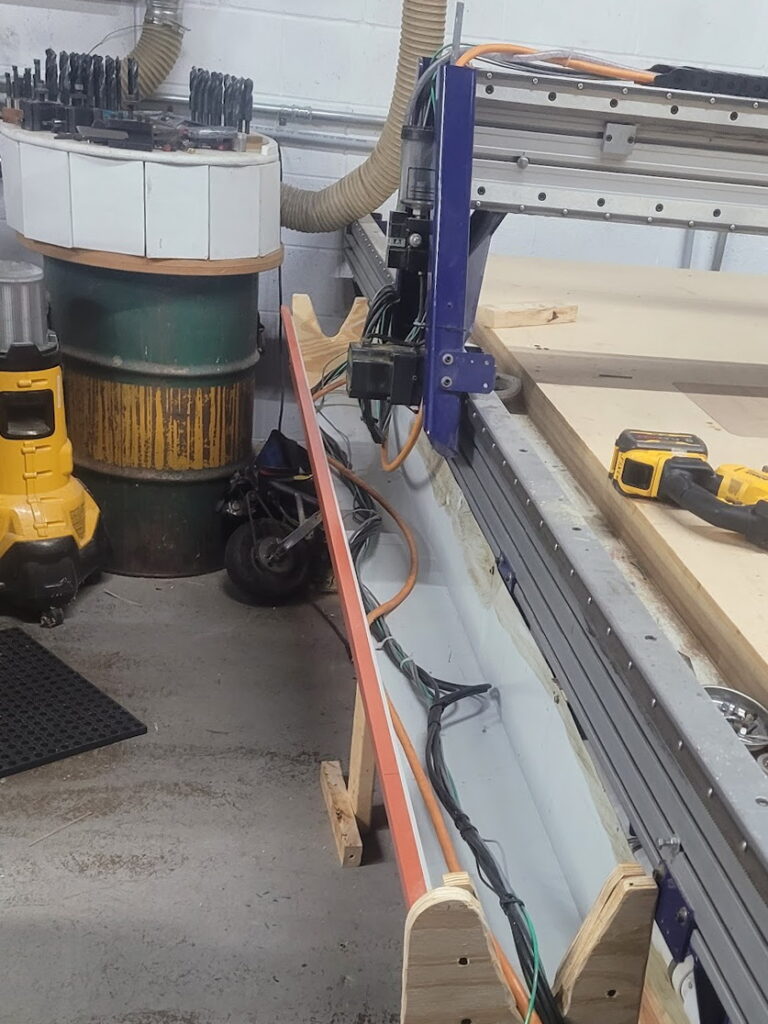

Also, cable tray!
It’s not stupid if it works
[Downloads at bottom of Page]

We’re looking at some new equipment for the space,
which means… we need more room! We found a fair
bit re-organizing, but this dust collection barrel caught
our eye.

Look at this barrel:
-Ugly
-Inefficient
-So much floorspace

This barrel is the first stage of dust-collection for our CNC – Air and dust come in one side, dodge past some vertical baffles, and exit to our main dust-collector for further filtering. Theoretically, the heaviest dust should fall into this barrel and be trapped, and over a few years of use it caught probably 20% of our sawdust. More importantly, it’s on the ground, and that’s space we could use for more tools!

Design:

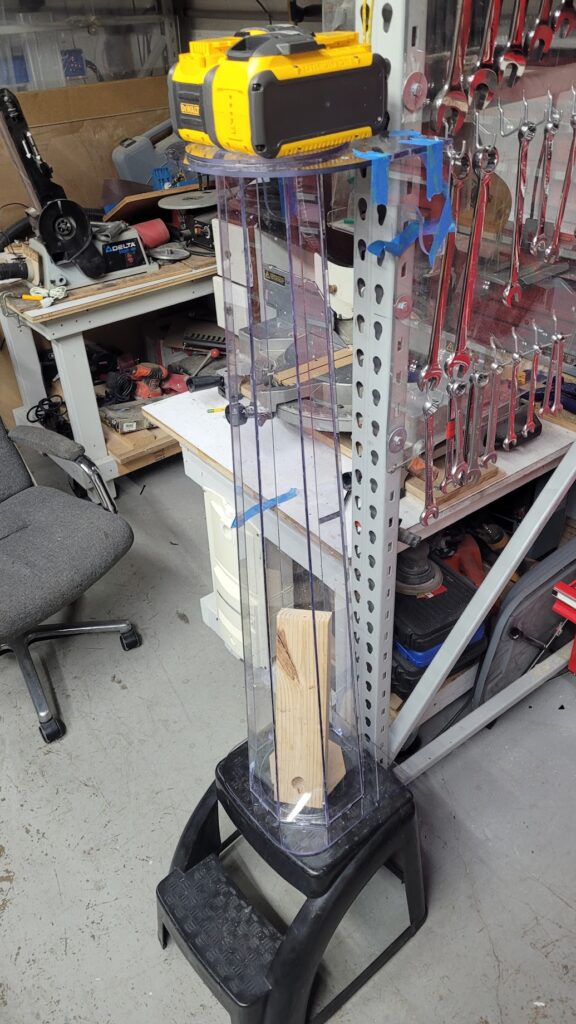
The first thought was just to put it on legs. But if we’re going to go through the work of building a stand for it, maybe it’s worth redesigning the system! And thus, I began researching dust collectors. I originally intended to make a transparent baffle system – smaller, clear so you could watch, better baffling – but essentially the same thing. But the research said cyclones were the best, and I fell in love with the idea for sheer cool-points.

So I searched high and low for cyclones that fit our shopbot and dust-collector flow, but they were all opaque plastic or thousands of dollars. We don’t have 5 grand to spend on cool-points, so that meant some fabrication if my heart was set on watching the dust swirl. First idea! We can modify an existing clear cone that’s generally the right size. Nope, still 1000s of dollars.

At this point I was at a loss, and booted up chatGPT for some rubber-ducking. This started with general size and flow recommendations, before exploring alternate geometry… Would a cylindrical cyclone work? It would work well enough – but 8″ lexan tubing was also prohibitively expensive…. what about a polygonal prism mimicking a tube? How many faces do I need to be 90% as efficient? 95% as efficient?

That’s when I realized I could switch the faces to trapezoids and approximate a transparent cone. From there, it was on to questions about injector dimensions/geometry/angle, exhaust port depth, and learning the ins and outs of cyclone design.

With a notepad full of dimensions and key features, it was off to CAD, where I set about constructing the cyclone and adjusting the design for manufacturability, mounting, etc. The end design was going to cost $380 at send-cut-send. Definitely more than I expected to pay when I started this, but I was too deep now.

I wasn’t quite ready to risk $400 on advice from a robot, so I sent my design out to other members at the hackerspace, and booted up grok to see if it would agree. After letting the gpts fight a bit (confirming assumptions, airflow, etc) they agreed it would definitely be more efficient than the old barrel, maybe much more efficient, and none of the humans saw any major flaws. So I dropped my orders, and after a few days 17 pieces of polycarb were on their way to the shop.
Theory

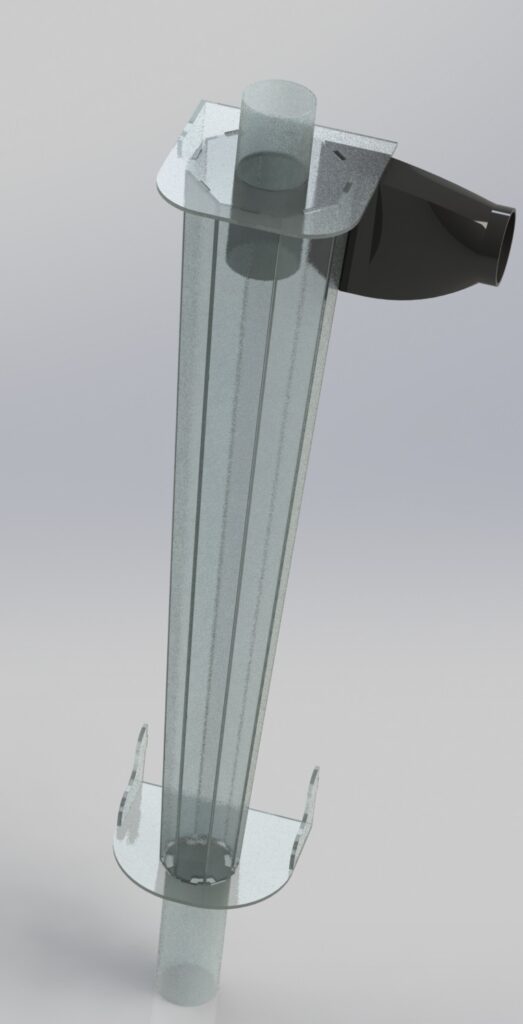
A quick primer on cyclone theory: The dust/air enters at the top, tangential to the walls of the cyclone. This induces a rotation, as the air/dust will begin to spin around the cyclone. The exhaust port needs to be lower than the injector – or at least lower than most of it – this forces the spiral and prevents the dust from short-circuiting the spin and heading straight up the tube.

Once the rotation is established, the dust is all flung towards the outward walls due to centrifugal force. Even though the dust is exceptionally light, it’s still heavier than the air, and an initial airspeed of 80mph means we have about 1000g’s of force pulling this dust outward once we hit the cylinder. This tornado of dust and air begins to descend down the cylinder, losing speed as some of the central (cleaner) air is sucked out the exhaust port on top. This is where the cyclone shape shines: Despite the air slowing, the shrinking diameter keeps the momentum up, keeping the dust flung out to the edges.

Finally, the tornado loses too much speed to keep the dust in the air, and the dust falls to the collection chamber below.
Construction

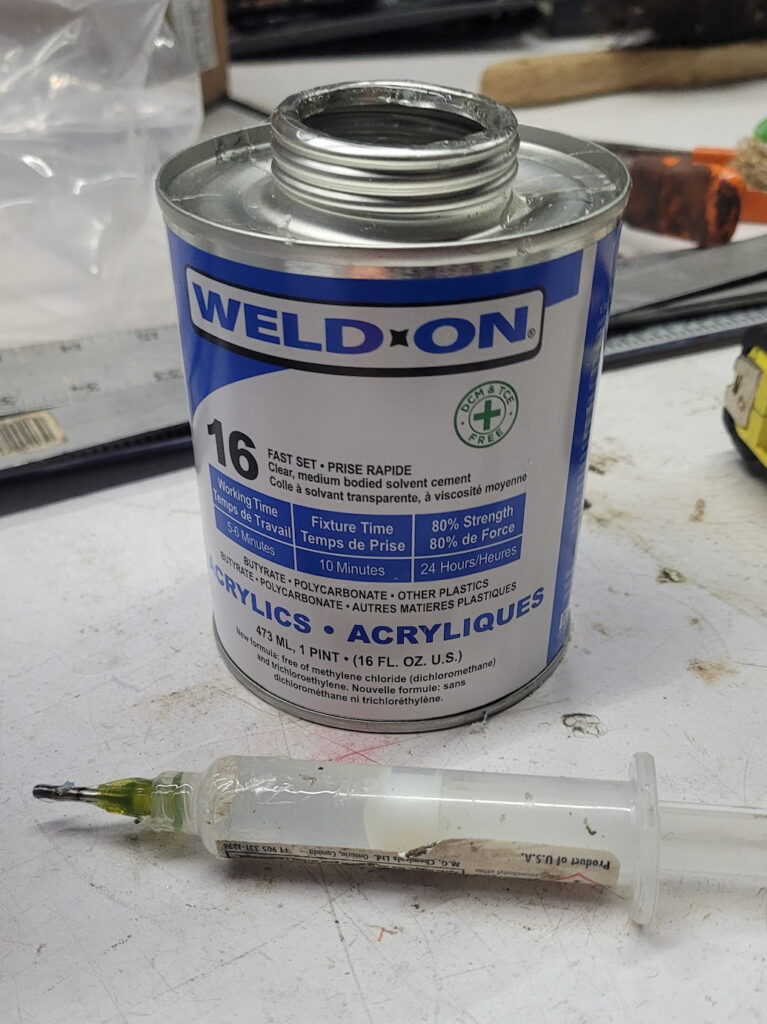
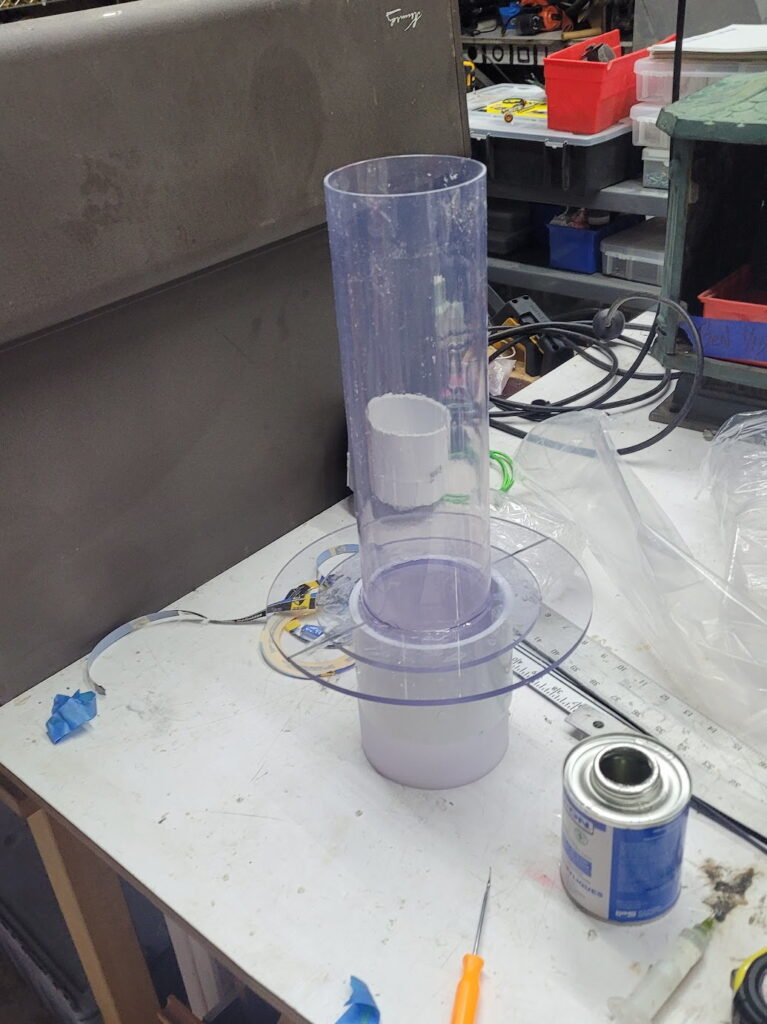
Now that all my parts are in, time for construction! The whole thing has to be glued together. I’m using WeldOn 16 (because chatGPT told me to) which is incredible at bonding Lexan. The glue-up was…. fiddly. I needed all the side panels to fit together at once, and one always fell out as I inserted the last few pieces. I ended up lasercutting a few temporary octagons to brace the sides, and had a friend help with a second set of hands while I got the first dots of glue in. Once it was partially glued, the rest went a treat, though somewhat slowly – I spent over 4 hours building the main cyclone body. Dribble a few drops of glue into a crack, move to a new spot, and repeat until there’s full coverage – I highly recommend a syringe for this so you can get the glue right where you want it and minimize drips / stringing (static cling is wild on this much lexan). A few of the trickier corners got a few dabs of silicone as well, just to make sure everything was truly airtight.

With the body assembled, it came time for the 3d bits. I printed the inlet adapter in PETG, and cut out a port for it to attach to at the top of the sidewall. If you’re building your own from these plans, please pick the appropriate adapter from the download file to bias air correctly.

The next 3d bits were the chamfers. A few internal chamfers at the top help establish the swirl early, improving efficiency. I embedded a copper wire in my chamfers, which will bleed static electricity, which should reduce friction from the dust sticking to the wall, also improving efficiency. These were glued in with the magic of WeldOn 16.

The only other non-plastic part was the lid gasket. I wanted to have access to the interior for cleaning and repairs, so I made the lid removable. A thin rubber gasket, etched with the laser cutter and cut with scissors, makes sure no air can leak through (especially important if you’re running ground-lines under the lid). In my build, I ended up clamping this lid on with clamps, but I’ve included boltholes in the updated models. You don’t need all eight bolts – in operation, the suction will hold everything in place, these are just in case the hoses tug the lid open.

Finally, I glued the collection pipe on. In retrospect, I regret this. I should have glued a threaded adapter to the bottom for more flexibility, better cleaning, easier mounting, etc…. but I was in love with clear and PVC isn’t clear. I did add a threaded adapter to the bottom for a clean-out plug. The weld-on appeared to be holding well enough, but it was such a tiny seam I glued in a 3d printed chamfer (externally) for some extra glue area.

Links/Downloads

Full download:

  • This contains all DXFs, all STL files, and all the full solidworks assembly.
  • I could split this by process, but I truly can’t be arsed
  • DXF filenames include quantity to order.
  • Except for the gasket, all parts should be 0.22″ (5.88mm) Polycarbonate
  • Left and righthanded injectors included. The cyclone doesn’t care, layout might
  • Bambu print files included, but,
  • Please use this link so we can get some free filament:
  • Also, you’ll need two of these pipes: 4×36 clear tube
  • And a can of WeldOn 16 (Please please please click this link regardless)

Results:

It was finally time to kick this on and see what happened. I was terrified it would immediately implode – there’s a lot of stress compressing this prism. A few of the members rallied around for support, and we hit the suck button. Immediately, we saw air swirl in and clean the top half of the cylinder, and as the CNC started cutting, a small band of chips orbited the top while the base tube started filling with dust.

Rough math (volume of dust * packing ratio / volume of material removed by CNC) is putting us just above 90% efficiency. This is significantly better than the previous barrel, and the quality of the dust (much of it is ultra-fine and very flammable, opposed to the flakey dust we used to get from the barrel) supports that hypothesis. The only downside is it means our dust reservoir needs to be drained after every major CNC session.

Video

Tools and Equipment

Membership comes with full access to all of our tools – though some of our tools require a quick one-on-one training session based on your familiarity.

Please click through our list and drill-down to what you’re interested in!

CNC Tools
    Shopbot
      5’x10′ Shopbot
      3/4 hp spindle
      Excellent at wood, foam, plastic. Aluminum is possible slowly with care.
      Vacuum Hold Down for sheet goods
      Professional Dust Extraction setup
    Bridgeport
      Manual, Conversational CNC, or G-code
    100w C02 Laser Cutter
      24″x30″ bed
      Cuts wood, plastic
      Engraves anodization great, engraves metal poorly
    50w Fiber Laser Engraver
      10″x10″ engraving area
      Amazing at engraving metals
      Accessories: Three lenses, rotary fixture
    Prusa 3D Printer
      We maintain a working 3d printer at all times
      We also have several less-working 3d printers that could be yours!
    Silhoutte vinyl cutter
      16″ width custom monochrome stickers
      This is how we do all the logos on Doomba!
Carpentry
    Tablesaw
      Cheap delta saw.
      Sled, fence, nothing too fancy
    Bandsaw
      Sweet oldschool bandsaw.
      12″ depth, 20″ throat
    Compound Miter Saw
      Dewalt, compound miter
      Not sliding, but still a workhorse
    Scroll Saw
    Router Table
      With fence, adjustable height
      36″x26″ table
    Hand Routers
      Plunge and trim routers
    Nailers
      Dewalt Cordless Framing nailer
      Pnuematic 18″ brad nailer
      Dewalt 23″ headless pin nailer
    Belt Sander
      36″x6″ belts
      Dedicated wood-only
    Planer
      Detla 12″ width
    Jointer
      Delta 6″ width
      IMO the scariest tool in the shop but we offer training
Metalworking
    Welders
      MIG (120v)
      Tig (240v), also does stick
      Stick (120v / cordless)
      500# Welding table for layout, fab, etc.
    Plasma Cutter
    Hydraulic tube bender
      Harbor Freight special
    Hydraulic Press
      20 Ton
    Angle Grinders
      Corded
      Cordless 20v and 60v
    Bench Grinders
    Anvil
    Forge
      Mostly for Aluminum casting
      Sandboxes for molds
      Crucibles, etc
    BandSaws
      Portaband
      Oldschool 12″ depth, 20″ throat – make sure to change belts for steel, but it will eat aluminum all day.
    Belt Sander
      Dedicated belt sander for metalworking.
Machinist Tools
    Bridgeport
      DRO or CNC options (see above)
    Lathe
      Sharpe 13×40 with DRO
    Mini-lathe
      Shureline? Jewelers lathe, not sure the details
    Drill Press
      1hp 3-phase beast
    Dial Indicators, Calipers, Micrometers, Etc
Electrical
    Dedicated Electronics Room
    Soldering irons
    Hot air reflow station
    Power Supplies
      Adjustable up to 36v/5amp
    Oscilloscope
    Electronic Load
    High-voltage tester
    Stereo Microscope with camera
Miscellaneous:
    Air compressor
    Forklift
      We do require a quick training session, but we will certify you to use our forklift!
    Hand tools
      Literally all of them. Do you need some screwdrivers or sockets? Please steal some.
    Power Tools
      A great selection of Dewalt power tools
      Every size of impact wrench
      Circ saws, recips, jigsaws, etc
      4 different types of sanders
      Oscillating multitool. Dremel. 4 different drills.
      A power caulk-gun. I didn’t even know that was a thing.
Automotive
    2x Jacks
    4x jackstands
    Oil drain pans
    Compression tester
    Valve compressor
    AC gauges
General
    Bathroom
      So women can come now. BRICE LINK THIS
    Kitchenette
      Fridge (beer)
      Toaster-oven
      Microwave
    Utility Sink
    Wifi
    Flame Cabinet
Stock / materials
    If you need a lot of something, you should buy it.
    If you need a couple of something, we probably have it.
    Nuts/Bolts/Screws
      Fully stocked cabinet of hardware
      Mostly English, but a fair bit of the smaller metric sizes
    Wood
      2×3/4/6/8 of various lengths, mostly under 3′
    Plywood
      Half sheets and sub-sheets of every thickness
    Plexiglass
      2×2 and smaller sheets
    Steel tube, rod, etc
      Up to 8′ length, random sizes
      Just make sure nobody has a nametag on it and it’s fair game
    80-20
      There’s a full shelf of 2′ 80-20 aluminum and fittings. Have at.
    Electronics
      Resistors, capacitors, fets, connectors, relays, etc
      The sorting is good, but not great.
    Solvents
      Acetone, Methanol, Paint Thinner, MEK
    Lube
      wd40, pb-blaster, moly, grease, etc
    Paints & stains
      Spray paints! 100 half cans that may or may not be clogged
      Stains! A dozen different stains in various
      Poly and acrylic clear coats!
      Latex paint that might be congealed but is totally free regardless.

Doubling your Laser Power for Free*

After doubling our power, and quadrupling our cooling we were excited to test-drive our new laser and push the limits… and it wasn’t that far beyond our old laser cutter. Which seems wrong – it should be twice as good!

So we started tinkering with the other variables, and we discovered that the volume of introduced air plays a huge part in how efficient the cut is. Too little air – like our current airbrush compressor – and we wouldn’t clear the soot from our cut. Then we tried too much air, and learned it would burn massive gashes through our material. But between 15-30psi the laser cuts so well it feels like cheating. We should have done this literally years ago.

*Technically, it’s Free

Air is free. We unplugged the cheap air-brush compressor that came with our laser, and connected the air line straight into our shop air compressor. While an air-compressor isn’t free, every shop should have one, they unlock so many options. If you have a laser cutter and no air compressor, forget about upgrading your laser, buy an air compressor. It is a supremely versatile tool, enabling all sorts of pneumatic tools, cleaning, cooling, and (surprisingly) laser upgrades.

Anyways… we shoved a blow-gun into the air port, and just like that we went from struggling through 1/4″ plywood to cutting 3/4″ plywood. I think it took six passes, but it’s still mind blowing. But I’m lazy and would rather not get a hand-cramp for every cut, so how do we make this more professional?

The $50 solution:

We started by brainstorming our ideal setup:
1) It still has to work without the air compressor,
2) If we add the compressor, it should only use the high-pressure air while lasing,
3) It needs to be idiot-proof

Then, we designed to the spec:
1) “It has to work without the air compressor”
We begin with two check valves. One to prevent air from from the air-brush compressor from escaping out the high-pressure port when the big compressor is detached, and one to prevent the high pressure air from damaging the weaker air-brush compressor.

2) “Without wasting pressure”
Next, we added an air solenoid. Every laser controller will provide a GPIO (General-Purpose-Input-Output) that indicates when the laser is firing. For us, it was called “Wind,” and it was a 24v tolerant port that connected to ground when the laser fired. So by wiring that to a 24v air solenoid we can limit airflow to when the laser is firing.

2b) Bonus light:
Because we have a 24v signal available, we decided we would use this to power a warning light to make sure everyone knew the laser was firing. And what better thing to light than the cut itself! So we added some LEDs to the enclosure to light the cut-in-progress. You could run these on the same 24v, but we fell down a rabbit hole and built a box to switch 120v using a solid-state relay.

3) “Idiot Proof”
Since we’re running a communal shop, we want this to be super easy to use. Which means we need to regulate our airflow independent of the compressor settings – because hooking up 120psi will pop the hoses off of the fittings and potentially start fires. In a solo-shop, you could just write a note by the port and manually adjust pressure. But for our communal and semi-production environment, we wanted the assurance provided by a secondary regulator. We stole ours from a dead air-compressor we found in a dumpster, but you can (of course), order one on amazon for $16: Please click one of the affiliate links**. This gives us a super-convenient “saved” setpoint for the laser – we set it to 20 psi for the best all-around performance, but it can be easily tweaked during a cut.

(Note: You want the solenoid valve before the regulator – that way your pressure isn’t limited by the narrow internal passages of the solenoid). And just like that, we’re now routinely cutting thicker wood, faster, and keeping our lens cleaner at the same time!

**Full disclosure: we link only products we actually use, and we have not tried this regulator
*** I had to spend to spend forever photoshopping this AI diagram. Trying to get gpt to get all the arrows correct ended up with this:

Cloudray M-Series Power Knob Bypass

A quick five-minute hack to use the external ammeter while retaining PC control of power settings

EDIT: MORE INVESTIGATION IN PROGRESS. DON’T TRUST THIS.

This article is for the Cloudray M100 Laser Power Supply, but it should apply across the entire M-series of Cloudray Supplies. Full Disclosure: This is an affiliate link. Even if you never intend to order a massive CO2 laser, just clicking that link will still help us stay afloat – Thanks!

The power-supply comes with this sweet display screen, letting you know exactly how much power you’re actually running! Not necessary, but cool. The problem is that when this is plugged in, the knob on the left side will override the power-setting that your laser control software (lightburn, etc) is sending. Cloudray claims they have a switch on the PSU itself to disable this, but our supply shipped without said switch.

Luckily, this is easily remedied with a pair of diagonal-cutters and a tiny screwdriver!

  • Remove the knob itself by pulling straight off
  • Insert the screwdriver to remove the back panel
  • Remove the PCB/Screen assembly from the housing
    • Gently push on the screen
    • Pry the retaining tab back just far enough for the pcb/screen assembly to move slightly
    • Repeat this for each retaining tab, working around the screen multiple times
    • Once both the PCB and then the Screen have passed the tabs, the assembly will slide free
  • Using your diagonal cutters, snip the center tab of the potentiometer
    • You can also desolder the entire potentiometer from the PCB if desired
  • Use the screwdriver to bend these tabs for additional clearance
  • Reassemble by gently sliding the pcb/screen back into the housing, and pop in the back plate
    • Make sure the PCB slides past the retaining tabs
  • Done!

And of course, we have pictures for all of this:

Bonus: How did we figure this out? / Why does this work?

We knew there were only two options for the layout of this control board. Either:

  • 1) There is a custom microcontroller on this control board
  • 2) This board has only an off-the-shelf display driver, and passes the other signals through

First, we checked the IC on the board…. if we could look up a part number that would be a giveaway – however, it was completely blanked out. So we investigated, trying to figure out where the signal from the potentiometer (signal is always the middle pin, with V+ and GND on the two sides) was connected to. Probing with a multimeter, we found a direct connection (0.2Ω – close enough!) between the center pin and pin 4 on the RJ45 jack! This points to the pass-through option, so we snipped it – worst case, we’d have to solder it back. We put it all back together and…. we were right!

Stuffing 100w of Laser into a 50w Enclosure….

Welcome to our infodump on doubling the power of your laser cutter! We’ve got a RedSail, but this should apply to the entire genre, so lets jump in!

First of all, links:
Laser: https://amzn.to/4jb3jAE
Power supply: https://amzn.to/3E6LaVD
Chiller: https://amzn.to/3FXQJ9r
Mirrors: https://amzn.to/4cnvjhT
Cheaper lasers I used for a totally unrelated project which are still badass: https://amzn.to/44f9X4f

Full disclosure: Those are all affiliate links. PLEASE click one. It doesn’t matter how many, doesn’t matter which one, doesn’t even matter if you order: if you ever use amazon it will help us keep gliding just above bankruptcy. That said, we did a extensive research before ordering and have been happy with each of the products listed.

Due to a series of unfortunate events (our water pump got unplugged), our laser tube died. It had been slowly aging, becoming less and less powerful over the years, and this provided an excellent excuse for more Speeeeed and POWAH! You see what I did there? You thought it was a meme but we desperately need that 0.5% commission. If you already clicked above… I’m sorry.

Shameless monetization aside, we had a few options, but beyond 100w those options are exponentially more expensive. We decided the sweet spot was right at ~95w, which meant a tube about 8″ longer than our laser cutter… We paired that with an 80w power supply – typically laser tubes perform equally well at 80% and max power, so this should result in a much longer life, especially with the new chiller.

First step, as always, measure everything. We grabbed dimensions off the existing laser cabinet, the chiller, and some random caster wheels that we found in the shop. Next, we threw all of that into CAD to mock up a frame.

A frame isn’t technically necessary, but this will live in a communal shop, and things get bumped – so we wanted to make sure our investment was protected.

Based on this frame, we then calculated the side-panel we needed. This was where the ShopBot came in clutch. We CNC’d the side panel – giving us the exact template needed for welding! So we cut angle-iron to size, clamped it all to the side-panel, and welded up two of them. Our chiller was 12″ thick, so we added some 14″ spacers, and then spraybombed the entire thing.

As some of us worked on the frame-extension, another team focused on the laser itself. We started by printing adjustable tube mounts. And then we modified the file, as attached here: LT2H.FCStd <True hacker skills, changing extensions to bypass automated filters>

With these mounts installed into the laser, we then built a shoddy mock-up of the laser tube so we could mark the new centerline… and with that, it was time to fully commit, and cut out the side of the laser enclosure. We drilled the center, used a compass to scribe a circle much larger than the tube itself, and then used a jigsaw to make the opening, before lining it with some slit rubber hose. We really really don’t want to break the tube against this sharp edge.

The last step before installing the tube was to build a sub-enclosure for the tube itself, to make sure none of the electrons (at 28kv!) or photons (at 80w!) escaped – while including access so we could actually get the tube into the enclosure. While we were at it, one of our members wanted practice building drawers, and knocked out a cute little drawer in the front, just the right size for some 1-2-3 blocks or calipers (the battery never dies!)

With that it was time to wire and plumb the tube! Both are pretty easy, the power supply had the exact same pins are our previous supply, and there are only two connections from there to the laser. For the Chiller, we wired the kill-switch to our laser’s kill-switch input – they both came with XLR plugs, and a straight pass-through was all they needed. Plumbing is equally simple, tubes from the chiller go to both ends of the tube, the chiller gets filled with distilled water, and is turned on – then we grabbed an automotive jack to tilt the entire laser and chase out the last bubble of air in the system.


The last step was also the most tedious: Alignment! First, we had to move the primary mirror forward 15mm (40mm of new tube radius – 25mm of previous tube radius), which was a quick drill+tap job. [Oh! One final link in case you haven’t clicked any of them yet (please do) – this was $12 and I love it.] Then, using small squares of paper taped in front of the mirrors (don’t tape straight to the mirrors, it can cook them), we adjusted the wheels on the laser mount until we were square, and hitting the center of the lens. – just a quick blip of the laser at 10% power will leave a burn mark on the paper to work from. Then, a bit of isopropyl on a q-tip to clean that lens, and move on to the next one! We adjusted the previous lens with minute twists of the set-screws in the back, taking a test shot at both extremes of travel, until we ended up with both locations hitting in the same place. Rinse and repeat for the final mirror, and we’re done! We hooked in the exhaust-fan and it was time to cut!